Hi! Can you tell us what happens when you click Play?
Game starts but its the money cheat that does not work
Add Money Mods seems to be working fine on my end. Please make sure to follow the provided mod instructions for it to work. You gotta be driving on the road for this to be triggered. https://youtu.be/hppCBpFf4pE
Does not work
Please Update!! thx
The American Truck Simulator cheats have been updated!
Changes:
- Bug fixes and game compatibility improvements
The American Truck Simulator cheats have been updated!
Changes:
- Bug fixes and game compatibility improvements
The American Truck Simulator cheats have been updated!
Changes:
- Bug fixes and game compatibility improvements
Hello!
I noticed they updated the UI and I am not sure I understand how the max level mod works now? the progress history screen doesn’t exist any more (or at least im unsure where to find it) so what do I do now?
O mighty wemod gods. update pls?
Hey! Could you let me know which mods you’re having issues with?
yes,  the max level mod is no longer working due to the change of the UI from what I can see. other than that the rest still works great!
I appreciate the response too by the way
I see. Thanks for the information. From my understanding, the UI updates only affect the appearance of the app and don’t alter the underlying mod codes. Have you followed the mod instructions for the max level mod?
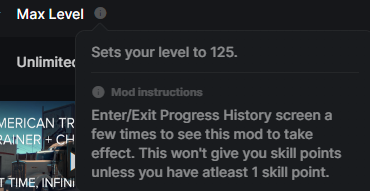
I have, and when i click in and out of the menus it doesn’t appear to take effect, I have flipped in and out of the progression tab multiple times as well. per the instructions any ways. but still no effect. unless I am doing it wrong? which i feel very strongly i understood the instructions but ya never know.
Since the progress history graph itself no longer exists i thought that might be the cause.
Gotcha! Have you tried launching the game initially and waiting until you can freely navigate within the game world before opening the mods by clicking PLAY on the WeMod app? If that doesn’t work, try launching the game first, and once you are on the main menu, open the mods by clicking PLAY again. Then kindly follow the mod instructions again.
Yeah no go still on my end, it just doesn’t seem to respond to that one feature. everything else is responsive per their instructions.
Apologies for the inconvenience. try to Verify integrity Files by right-clicking on the game and click Properties. Click on the Local Files tab. Click on Verify Integrity of Game Files. Then force quit/close the WeMod App then re-launch the apps.
Okay so verified files, closed all wemod processes and then lauched the game, loaded in to where i could steer, paused, hit play in we mod, then activated the max level mod by itself. returned to game and proceeded enter and exit the career progress screen, I did this about 20 times and still no changes.
So I thought I’d create a new save just to try and replicate this problem, as I have a save that I’ve already boosted to max level (before SCS changed the character history page) and one that I’m keeping legitimate (for co-op play).
I can agree with xMrLotusx that it didn’t work for me either. So I’m wondering if there’s some back end code change on the UI now (even so minor of a change). As it did boost my one character save before the change (as mentioned).
Otherwise the four that I normally use (Freeze Time, No Damage, No Fatigue, Unlimited Fuel) are still working for me.
Thanks for the info! We have reported the issue to the team, and they’ll have someone test it. We’ll get back to you as soon as we get updates.
1 Like