Thank you. Gonna try this out. Since their support is nonexistent…
1 Like
Haven’t been able to make it work.
1 Like
Mods aren’t working properly!!!
1 Like
thank you so much, work perfect 
1 Like
你好 为啥修改选项没有中文的?
1 Like
The Black Myth: Wukong cheats have been updated!
Changes:
- Instant Spell Cooldown cheat added
- Will Multiplier cheat added
- Exp Multiplier cheat added
- Edit Chill Resistance cheat added
- Edit Burn Resistance cheat added
- Edit Poison Resistance cheat added
- Edit Shock Resistance cheat added
4 Likes
Thanks for exp multiplier fling.
1 Like
Thanks for the updates FLiNG!!!
1 Like
看不懂思密达
1 Like
100% item drop pls
2 Likes
The Black Myth: Wukong cheats have been updated!
Changes:
- Bug fixes and game compatibility improvements
3 Likes
click/push a button on the item you want to edit. set quantity in wemod. click/push a again. do that for every item you want to edit quantity of, then save at shrine and reload. that’s how i got it to work for me.
3 Likes
set the skill points to what quantity you want. level up or reset skill points at shrine. when you spend skill points it should update to the quantity you set in wemod. it’s a one time thing so skill points will not stay the same amount, so if you use all the points to 0 remaining it won’t work unless you change the quantity and level up/reset points again.
1 Like
Really good trainer for me! I only use it for dmg and exp multiplier. Might also use it for changing amount in inventory. Thank you so much for it 
1 Like
That worked! Thanks dude!!!
1 Like
Thank you for this excellent and complete game trainer. I’m not a combat and soul-like game-oriented gamer so the trainer let me focus on enjoying the journey, the beautifully crafted settings, the interesting plot, and the mythological lore game elements. 
2 Likes
Tried both shrine and level up methond and Sparks points still don’t set to wemod number.
1 Like
Hi! I assume you purchased your game through Steam. Have you followed the mod instructions carefully? Also, did you remember to click the check button next to the amount you input?
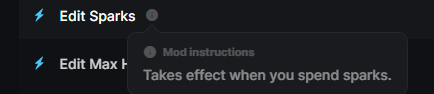

1 Like
Ah thx didn’t know you had to click the check mark. Thought the check mark meant the mod was on lol.
2 Likes
you need to apply the mod to work. click/push-a on items, set the quantity then !!!click the check mark or set button(overlay)!!!, save at shrine and reload. (repeat for every time)
1 Like