The Core Keeper cheats have been updated!
Changes:
- Bug fixes and game compatibility improvements
The Core Keeper cheats have been updated!
Changes:
Unlimited health is not working still.
Needs updating again,
Unlimited Health, Super Speed, No Clip and Unlimited Armor Durability have stopped working.
Hi this needs updating, unlimited health is not working anymore. thank you c:
Also seems like the custom amount mods aren’t working anymore either.
uummmmmm do you mind updating the mods when you get a chance please… cherry on top

For a game that is seeing regular updates, I wonder why the trainer doesn’t receive the same sort of attention. fingers crossed this will eventually be updated.
The Core Keeper cheats have been updated!
Changes:
Thank you 
hey I’m new to the forum but have been using WeMod for a while now and just recently became pro but I have a question, Why were these cheats removed, the Easy craft and the other one i cant remember what it was but when you walked around on the map it identifies a but portion of it instead the usual amount.
Hello, and welcome to our forums! From what I know, mods/cheats are removed when they disrupt the game, impede progress, or lead to crashes. These particular cheats could be easily detected by the game’s anti-cheat system, frequently resulting in-game crashes and such.
The Core Keeper cheats have been updated!
Changes:
Unlimited food doesn’t work. Possible to fix?  Thanks!
Hi! Where did you buy the game from? Also, is it the only mod option that isn’t working?
I bought it from Steam today! So far it seems only unlimited food doesn’t work. At first i thought also the item right click didn’t work, but that one only works in a solo world.
the “reveal Larger Area”
Please, I really need it
As far as I can tell, most of the options are working. However, anything messing with inventory does not seem to work. Increase, decrease, or set value are all doing nothing at all. They don’t make the error noise when I try to activate them, it just doesn’t change anything.
Hi! I assume you purchased your game from steam. Have you followed the mod instructions for the options you’re trying to use like the instructions below?
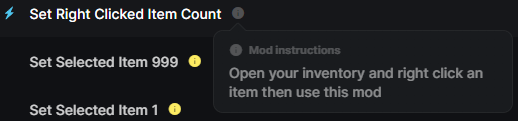
Oh yes, I know how it works normally. I has worked in the past, it’s just not working now, at least for me. I’ve even restarted everything to test. I dunno.
That said, there’s a big update coming at the end of the month for the game, so I’ll just wait until after that drops, since I’m sure the trainer will need an update with it then. So if it’s just a me thing, hopefully it’ll fix then.
I see. We can try some troubleshooting steps first. Have you attempted launching the game initially, waiting until you can freely navigate within the game world, and then opening the mods by clicking PLAY on WeMod App? Make sure to use the most recent trainer version, which you can check by going to the Mods version under Mod settings.
If the instructions above don’t resolve the issue, try verifying the integrity of the files. Then, force quit or close the WeMod app and relaunch it.