not working again needs update
1 Like
Mods are still not working. As soon as I press PLAY, WeMod closes itself
None of them works, as soon as I press PLAY, wemod app closes itself and cheats doesn’t work
Hey! Make sure to use the most recent trainer version, which you can check by going to the Mods version under Mod settings. You can also try to Verify integrity Files by right-clicking on the game and click Properties. Click on the Local Files tab. Click on Verify Integrity of Game Files. Then force quit/close the WeMod App then re-launch the apps.
1 Like
I have done it all. Most recent trainer version and I verify the integrity of game files. Still doesn’t work. When I press PLAY, Wemod APP closes itself
personally it works for me just fine.
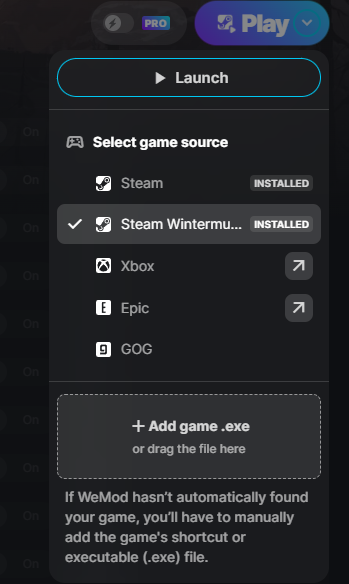
here’s are several questions. do you have any third party anti-virus software. have you whitelisted wemod on windows defender. what’s your pc’s hardware cpu, gpu, an ram also are you playing through steam or through one of the other launchers like epic or xbox. and are you playing survival or wintermute.
an one last question by chance do you have your storage drive nearly maxed? that might be the cause its not really stated but always keep your drive 4/5ths full they need 20% - 25% to function properly. if full it can cause crashes when running a app like wemod with the game
WeMod was working perfectly before the Broken Silence update.
- I dont have any issues that you mentioned ( antivirus or storage etc. )
Steam, Survival.
When you cook fish with Unlimited Weight ON, you do NOT get Lantern Oil.
Disable Unlimited Weight and you once again get Lantern Oil from cooking fish.
I’m ok with both the new durability and freezing durability, but I will say that having 100% on everything makes gathering and saving food for cooking so much easier. I can actually attempt to make recipes that would normally be difficult to get all the ingredients for!
maybe uninstall then re-install Wemod.
done it several times, even re-install the long dark. nothing works.
what hardware are you running? you haven’t answered that. and are your gpu an cpu drivers up to date?
We mode closes when the game opens. Help please
Hi there! If you haven’t already, please try adding exclusions for these two folders in your antivirus:
C:\Users\%USERNAME%\AppData\Local\WeMod and C:\Users\%USERNAME%\AppData\Roaming\WeMod
It didn’t work
I see. Just to confirm, is your overlay enabled? If so, try to disable it then check if issue persists. Kindly check the upper right corner of the trainer and you will see the Overlay then disable it.
Problem solved
WeMod/ settings/ customization/
Enable new WeMod overlay (off)
Use alternate overlay hotkey (off)
Most cheats cannot be activated.
This was still better than the previous version.
Everything from F5+ does not work, it disables itself, with and without overlay. please advise.