Disable it. You have it enabled.
same…ah…
I am solving the problem for 12 hours.
@Nervenkobold Friend, if you have the least PC notion check the folder I mentioned above and you will see the .exe of the game. Just will not be there if you changed the installation location in Uplay. The link that you mention is in the shortcut on the desktop, obviously it will not point to the folder of the game, the same happens in the steam the shortcut is just a symbolic link to the game. The game is in the folder I mentioned to you before.
Is there anyone here
I did “version guard off”
I tried to run the exe file ‘Program Files (x86) -Steam-steamapps-common-Wildlands-GRW.exe’, However ‘We’re having trouble starting or finding your opened game.’
ps.
1, I bought the game on Steam, and the game version is ‘3176580’
2. try version guard off / on
3. window x64
…
I will click play and it will start to load then right before the game starts the trainer will stop loading. I have the game on steam and this trainer worked for me before.
If steam there’s actually a cmd in the eac folder (in my desktop dunno about yours) which uninstalls the eac for awhile enough for you to replace sunbeam’s eac.dll stuff around 3kb after I think you’ll be able to use the trainer.
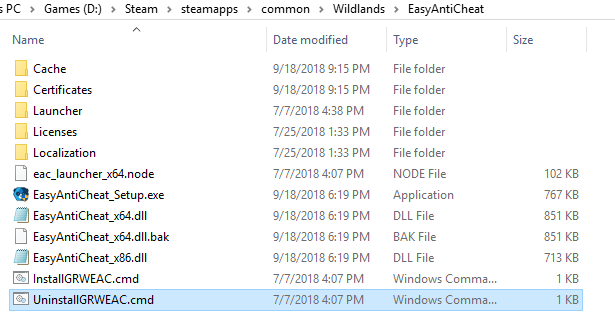
I also noticed that every time I exit the game before I used the cmd, sunbeam’s eac.dll will be replaced with the latest eac.dll which prevents you for using the trainer so I did the stuff above and it kinda work for me…
If you didn’t get my explanation I’m sorry I really sucked at it hehe… but I hope this helps…
Ok… I will see tomorrow… Ty so far
i do have it on steam and i did do hat but my problem is still persistent.
That’s strange I just did the stuff above and it work…
I just clicked uninstall.cmd and replace the eac64.dll with sunbeam’s eac64.dll.
Clicked play in WeMod then it works…
I alsodidn’t include the -eac_laucher stuff.
I can’t really figure out the problem if it still doesn’t work…
how do i replace the eac64.dll with sunbeam’s eac64.dll?
how do i replace the eac64.dll with sunbeam’s eac64.dll?
If you have sunbeam’s dll drag it into the eac folder, it will replace it.
where do i get it
I forgot the site though. Just ask sunbeam if you want one or try to google it. There’s a thread where you can get it.
Thx
I do not know what the problem is.
You don’t need it. WeMod automatically replaces the .dll when you launch.
ok then
I always get “EAC Not Found” and I’ve never been able to fix it.