I used the ones labeled all character stats changed, and just save/reload/save again, and then turn those ones off. I just made one using Shadowheart, and it worked, so not sure why people are saying it doesn’t work for origin characters.
if you are using an origin char, you should try using the edit all playable char options. this should work
apparently there is a new update on bg 3 and requires testing. do i actively have to do something by clicking or writing to help end the testing phase or is it something modders have to figure out?
I’ve always just kept playing with mod and then rated my experience with it. I assume they are tracking reactions. I haven’t had any issues despite the most recent patches, I play with DirectX. So I just rate it whenever I get a prompt after finishing playing.
As of today (09/08/2023), all of the mods are working for the latest update on Steam.
Edit last selected character stats still not working.
When I use “Edit All Playable Characters: Constitution” the new stat shows on their screen (ie: 8 becomes 28 when I add 20 points in Wemod) but the health isn’t reflected in the new stat.
Edit: Seems to work, have to drink an Elixir that changes your stats like “Elixir of Hill/Cloud Giant Strength” and it seems to refresh all the modifiers in the stats.
Also i’m not sure if anyone else has figured it out, but with “Items Don’t Decrease” enabled, things like the tablet in the druid grove will not work properly I found, I was able to put more than one tablet of the wolf in the pedestal and nothing worked to open the secret room. Though when I turned off the cheat it worked fine. Same goes for the Skull in act 3, though you still get the completion of that event, you still have the skull in your inventory and all effects of having it. The headless ghost follow you around in the sewers
The wolf tablet thing in the druid grove kinda works. You just have to activate all of the tablets you put in the wolf pedestal, not just one. You can highlight them by holding ALT
The cheats works as intended, just for certain items like that, just deactivate the cheat, use the item, then turn it back on. It takes less than a second.
And as far as the stats cheats go, are you setting it to where you want it, then saving/reloading the save? That’s how you activate it, and I have not had any issues with it at all. I use it at the very start, then save/load my game, turn off the stat cheats, and save it again, and I haven’t had any issues with health or other stats not updating.
Had anybody else had their context menu stop working after using Roll Dice Always Succeed? I play on controller but if I switch to kbm it still happens.
It never happened until patch 2, and it doesn’t happen every time I use the cheat either.
I played for hours yesterday with no issue, but a week or so ago it happened, and then again today. Only thing that fixes it is restarting the game and not using that cheat.
ETA I’m beginning to think it’s actually just a bug with the game in switching from controller to kbm and it just happened again with WeMod not on…
Yes, it’s exactly that causing this issue. I have seen other people on their webpage complaining about it, as well as on Steam. I just set my game to not automatically switch, and it stopped occuring for me.
“Edit Last Selected Character” is not working for dexterity only
EDIT: NVM, some work sometimes, but not others. Can’t tell if it is just specific characters or not
Anyway to get the old cheat for 'Spell Slots not used"
Why? When “unlimited movement/action” does the same thing (just turn it off before the enemy turn).
I’m playing on GoG but the trainers have been universal since EA and I have never had issue with stat editing until mid August. Now, I can edit any Origin character when they are an NPC, but cannot edit any character that is custom. I spent 3 hours messing around with it this AM and though I could get any stat on any NPC in my party, moving hteir stats up or down, I could not do anything to my main character. It was a bit infuriating after try 700+ over the course of said 3 hours. The real bugger was not being able to lower Wyll’s Charisma back to 18 where it had been pre-messing around and I eventually gave up on a save that had it at 21 (I had tried to raise my main characters 3 and it raised Wyll’s, then loading other saves were tacking on previous adjustments seemingly at random and most certainly not on the character previously clicked on). I’m just going to play with them as they sit for now. Maybe take Wyll out and put Gale in until it gets updated again as whatever the game changed with it’s last two updates, specifically the last 525Kb one, seems to have made a mess out of the stat editing and I have zero idea why. It was so much easier when games just let you edit vi console commands. Why Larian, of all companies, does not allow it in a single player RPG is kinda stunning.
Oh well, hopefully this gets figured out sooner than later, or official mod tools are released to make everyone’s job over there easier.
Same, I haven’t had an issue with anything, for example my main test save has my custom character at 30 for stats, and all the other (NPC) characters are stock.
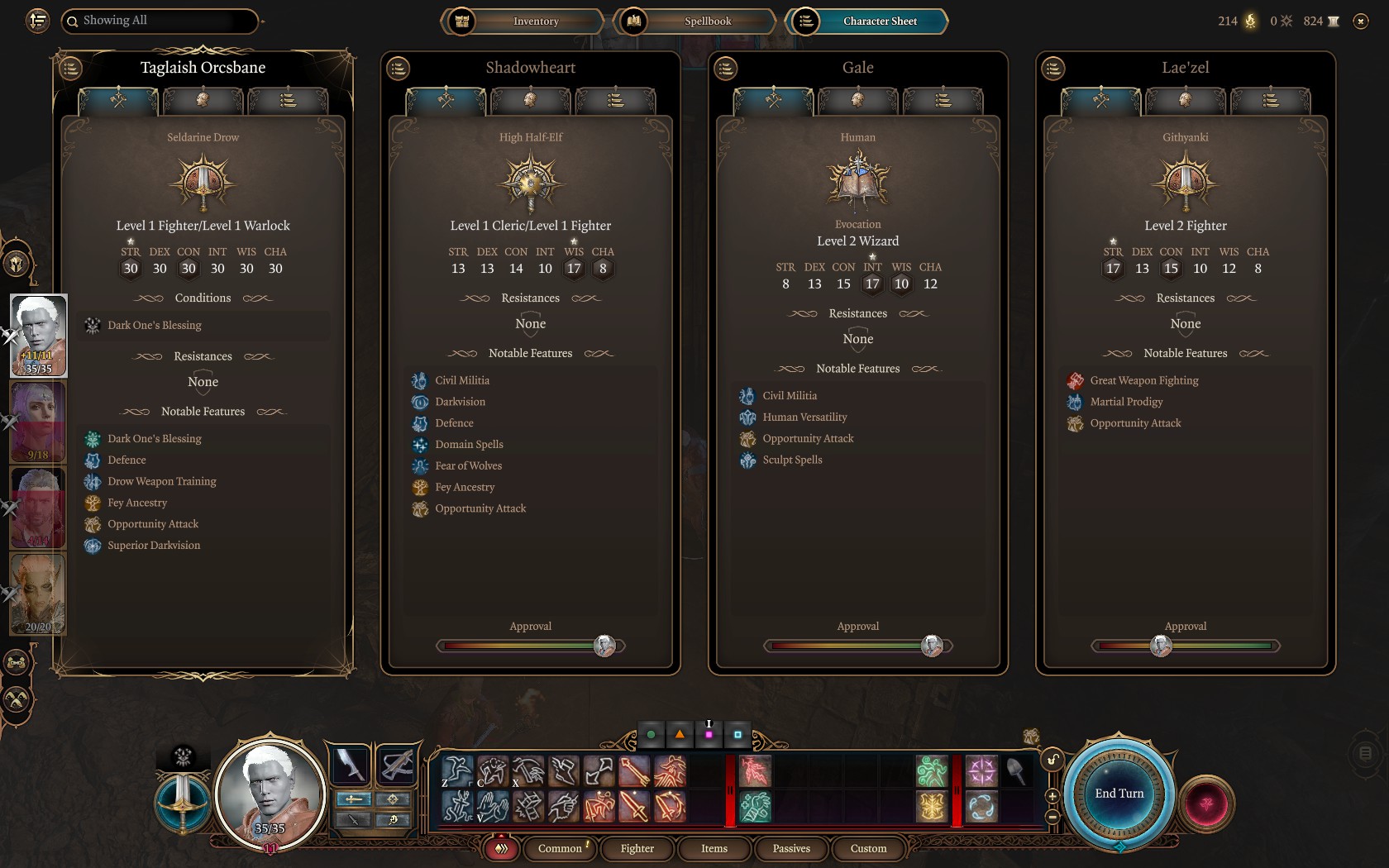
1 Like
Hi all… My trainers aren’t working at all. I know BG3 had an update not that long ago. After the update, there was a big note on WeMod saying it needed time for the trainers to be re worked or something. So now nothing works and I am wondering if I am the only one or if someone can help to solve this. Thank you!
Everything I use worked as of four hours ago (used it for a few hours after I posted the screenshot above).
What I do is (from a fresh boot in the morning when I get up if it’s the first game I play):
start wemod,
start steam,
start game launcher from steam,
start game from launcher,
close launcher once main game menu is up,
start trainer through wemod,
activate what functions I use,
load game save,
and that’s it
Hello Community, since some days I‘m trying to edit my character‘s stats. But unfortunately it‘s not working yet. So please, could someone write me a tutorial how I can edit character stats by wemod, please? Thank you. 
The wemod instruction is to begin with playing the game in Steam and once it is going to hit PLAY in wemod. When I enter wemod in game, I get a message to start game in wemod first. So I can’t play the game in wemod.
There is nothing on our end that would be doing that. Please post a screenshot of the message.