This is the official discussion topic of the
CYGNI: All Guns Blazing Trainer and Cheats in the
WeMod app. Please post any suggestions, bug reports, or praise that you may have for the cheats in here!
Download the trainer or find it in the WeMod app.
Trainer Options and Cheats:
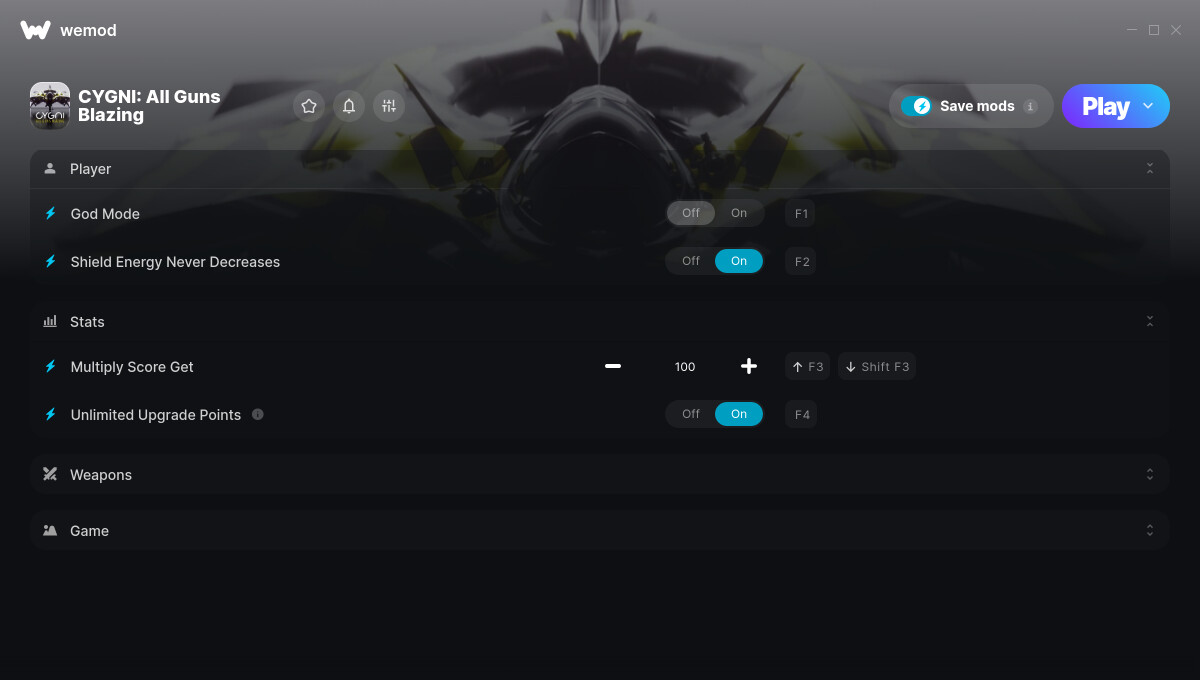
1. God Mode
2. Shield Energy Never Decreases
3. Multiply Score Get
4. Unlimited Upgrade Points
5. Unlimited Weapon Energy/Missiles
6. Auto Fire Main Gun
7. Game Speed
Screenshot:
Supported Game Versions:
We strive to keep our trainers up to date with the latest game versions. WeMod automatically detects which version you have installed and activates the mods accordingly. So there’s no need to worry about which version of the game you have!
Updates and Changes:
Like what you see?
Check out all of the games WeMod supports here.
The CYGNI: All Guns Blazing cheats have been updated!
Changes:
- Released trainer with 7 cheats
game can’t run write " fatal error" so many cheat i use from we mod only this game can’t run with cheat, normal without cheat
Got this game as it was on sale on Steam. WeMod didn’t detect the game after downloading/installing, nor booting up the game for the first time via Steam. Tried to manually add the .exe and when I tried to launch via WeMod, got a crash error message.
All other games I’ve downloaded, WeMod recognizes and able to load with cheats just fine.
I confirm problems of others users with recognize this game on steam; add a another info: game not start if I execute directily EXE file (Fatal Error occur), play only for a Steam command “steam://rungameid/1248080”
Hi! Sorry for any inconvenience. Please remove the exe if you added it manually, then try verifying the game files on Steam. Go to your library, then right-click the game. Select Properties > Installed Files > Verify integrity of game files. Wait for the process to finish.
Start the game on Steam by manually selecting it from your library. Then, load your game save. Wait until you can move in the game before you click Play on WeMod.
It’s all clear and everything is done. WeMod does not show any plays and always reports that he does not find the game

The image you posted is broken. Can you try adding the game’s exe again? Make sure you have selected the correct one. If you are unsure which executable should be used, please check task manager while the game is running by right-clicking the game and selecting *Open file location.
Also, try whitelisting or adding exceptions for the following folders on your antivirus:
C:\Users\USERNAME\AppData\Local\WeMod
C:\Users\USERNAME\AppData\Roaming\WeMod
the wemod’s user directory is added on antivirus.
game icon are created from Steam with this path steam://rungameid/1248080
the game have 2 exe files in:
C:\Program Files (x86)\Steam\steamapps\common\Cygni\Cygni\Binaries\Win64\Cygni-Win64-Shipping.exe
(game window)
C:\Program Files (x86)\Steam\steamapps\common\Cygni\Cygni.exe
(descripted how “BootstrapPackagedGame”)
if I add Cygni-Win64-Shipping.exe in Wemod and try to play game, it receives a fatal error if it is not already running.
is normal? other games run from Wemod directly
Thanks for the info. I’ll report this and have someone test the trainer. I’ll post an update here if I hear back from them. Sorry for the inconvenience.
Thanks to you, however, I was able to perform both the game and wemod. I hadn’t succeeded alone. Now I played for 1 hour without activation problems.
I remain the fact that making him perform directly from Wemode does not work.
Thanks for replying
Sorry for the inconvenience. The trainer is now in the queue for updates.