This is the official discussion topic of the DRAGON BALL FighterZ Trainer and Cheats in the WeMod app. Please post any suggestions, bug reports, or praise that you may have for the cheats in here!
Download:
Download the trainer and find it in the WeMod app.
Trainer Options and Cheats:
1. Unlimited Health
2. Unlimited Zeni
3. Unlimited KI
4. Unlimited Time
5. Easy Kills
6. Unlimited ZCapsule
Important Notes:
Click here to view important information about these cheats.
You need to uninstall EAC - Easy Anticheat to use this trainer.
Then you need to set launch option in Steam to disable EAC from the game. To do that, right click on the game in steam > Properties > Set Launch Options and then type “-eac-nop-loaded” without quotes in there and click OK.
Block DBFighterZ.exe and RED\Binaries\RED-Win64-Shipping.exe files in your windows firewall to stop game from going online to be safe from any bans.
You may need to restart Steam or your PC to completely unload EAC and for these settings to take effect!
We strive to keep our trainers up to date with the latest game versions. WeMod automatically detects which version you have installed and activates the mods accordingly. So there’s no need to worry about which version of the game you have!
Updates and Changes:
01/29/2018 Started development
01/29/2018 Released trainer with 5 cheats
01/29/2018 Bug fixes and game compatibility improvements Updated notes
01/29/2018 Bug fixes and game compatibility improvements Updated notes
01/30/2018 Bug fixes and game compatibility improvements
02/04/2018 Unlimited ZCapsule cheat added
08/20/2019 Bug fixes and game compatibility improvements
Hi i have follow the instruction that said to uninstall EAC and block both DBFighterZ.exe and the RED-Win64-Shipping.exe on the firewall of windows after all that even if i restart my computer or steam they always said that EAC is not install and the game do not start
I don’t know how i can help since it is not a problem with infinity or trainer. This is how you can disable EAC in this stupid game (blame the game devs for being proper dicks to single player cheaters).
I’ll just explain the steps again
Uninstall EAC - Simple enough
Make the game stop wanting EAC otherwise it will complain that EAC isn’t installed. To do that, set launch options in steam for the game and paste
-eac-nop-loaded
You also need to block the game exe from communicating online otherwise it still doesn’t work!. Make sure it is the outbound rule you’re setting
This file
\steamapps\common\DRAGON BALL FighterZ\DBFighterZ.exe
and this file
\steamapps\common\DRAGON BALL FighterZ\RED\Binaries\Win64\RED-Win64-Shipping.exe
Completely block all outbound communication.
Then start the game FROM INFINITY and hope it works. It wasn’t until i restarted steam and must have restarted game several times until it just decided to work. Try putting steam in offline mode, maybe that can work. Or unplugging your internet.
It’s pretty evident game devs don’t want you to play the game in offline mode especially not without EAC so my suggestion is to ask for a refund if you still can. If at least a thousand people refund or less than that and this hits news, hey maybe this will teach these a$shole game devs to be a little nice to single player cheaters. But that’s hoping for too much.
I got everything working after some restart because of EAC
Everything works fine only Unlimited Zeni don’t work When pressing the Hotkey it activate and deactivate instantly :’(
But The rest is good
And launch the game by Infinity or it won’t load properly
What a focking mess. I couldn’t get it to start either now after the update.
Spam from steam and wouldn’t work. Added a shortcut to exe and added -eac-nop-loaded to commandline and it wouldn’t work. Then i click Play in infinity and tried to launch it from there and it worked!.
So yeah try different things. It will eventually work.
Please don’t complain to me “oh it isn’t working” because i am not the game developer. I am only concerned with trainer so please post about that if it’s not working
i have block internet to both the .exe file on my windows firewall
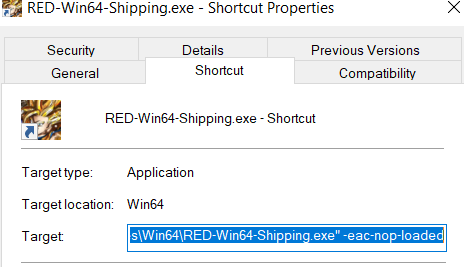
i have put -eac-nop-loaded on my shortcut of RED-Win64-Shipping in the target line
i have done the same thing on steam in the launch option -eac-nop-loaded
i have launch the game from the trainer the first time that didn’t work i click on retry after that the game was working fine and the cheat were working at least for inf hp and ki didn’t try the other one
Sorry to bother you but when I put the -eac-nop-loaded in the target line of RED-Win64-Shipping, it says it’s not valid. Would you have a solution? Thank you.
make a space after the little quote thing like that “E:\Steam Games\steamapps\common\DRAGON BALL FighterZ\RED\Binaries\Win64\RED-Win64-Shipping.exe” -eac-nop-loaded





 When pressing the Hotkey it activate and deactivate instantly :’(