Hi sandy,
Are you gaming on full HD ?
The GTX 1050Ti is not that much of a powerful GPU (128-bit memory bus, 768 CUDA Cores), but nonetheless you should be able to game on 1080p, at the sacrifice of some graphic settings (depends on the game).
GTA 5 is not a very graphic demanding game though. Well optimized for the PC.
Don’t use MSAA. Try the NVIDIA’s Dynamic Super Resolution (DSR) setting, to eliminate any aliasing.
MSAA can impact performance in a critical fashion. You can disable MSAA entirely for the best performance, as it eats the texture fill-rate and bandwidth of the GPU.
Though, if you really want to enable it, then please use and force the MFAA setting.
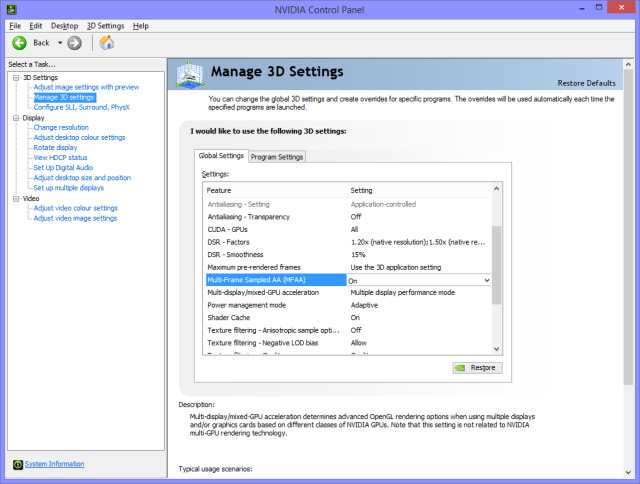
For GTA 5, if you’ve opted for Multi-Sample Anti-Aliasing (MSAA) in the Game settings (2x, 4x etc.), then you can enable/force the ‘Multi-Frame Sampled Anti-Aliasing’ (MFAA) option via the NVIDIA Control Panel (global settings).
But why not use the TXAA option in GTA 5, which also helps in removing the temporal aliasing, if you wish ?
Here’s the thing.
Actually 4xMFAA has the performance cost of 2xMSAA, but with anti-aliasing equivalent to that of 4xMSAA.
MFAA/Multi-Frame Samples Anti Aliasing offers MSAA quality, at a way lesser impact on overall performance.
MFAA is close to MSAA quality wise, and effects it, when this mode is enabled.
The end result which you can get is that MFAA, can deliver Image quality same as that of 4x MSAA at roughly the performance COST of 2x MSAA, or 8x MSAA quality at roughly the cost of 4x MSAA.
IMO, MFAA is close to MSAA quality wise. It doesn’t blur the image much, unlike other AA modes.
MFAA offers MSAA quality, at a way lesser impact on overall performance.
Like e.g., 4xMFAA has the performance cost of 2xMSAA, but with anti-aliasing/AA equivalent to that of 4xMSAA.
So 4xMFAA would, ideally, take a 2x MSAA performance hit but offer 4xMSAA quality, if not a little higher.
For the game GTA 5, If you’ve opted for Multi-Sample Anti-Aliasing (MSAA) option in the Video Game settings (e.g. 2x, 4x etc.), then you can enable/force the ‘Multi-Frame Sampled Anti-Aliasing’ (MFAA) option via the NVIDIA Control Panel (global settings), for better performance.
On a side note (kind of serious Off-topic). I’m sorry, if this is hard or confusing to grasp.
But YES, your PASCAL GPU architecture supports DX12 Gaming easily (and, async compute), same as AMD, which has the advantage in Asynchronous Compute.
Only applies if you are using Windows 10 OS though.
“It now uses pre-emption and dynamic load balancing, for faster performance than previous GEN GPUs, so you won’t have issues with DX12 games either”.
IMO, the PASCAL GPU is now able to dynamically overlap workloads in the pipeline. The previous GEN MAXWELL cards did this via static partitioning in software.
For Maxwell GPUs, pre-emption was only available at the draw call level.
But now, dynamic Load Balancing helps to allows the workload to be partitioned dynamically, which means all parts of the GPU can be put to work, without wasting much, to complete the task faster, hence improving performance.
Though, I think, the Pascal architecture still cannot execute the async code concurrently, without pre-emption.
But nonetheless, the gap exists between Nvidia’s and AMD’s hardware. AMD still has the upper hand in DX12, but again, this all depends on how the game is CODED, so NVIDIA is good as well.
Nothing to worry here.
PASCAL might have a smaller performance penalty, at least than Maxwell, that’s all I think, as of now.
 someone told i need both of these enabled ? plz i need some help enabling mfaa/aa.


