Sneak Peak of the modding tutorial thread I have been working on. This is nowhere near finished but tell me what you think of this little tutorial. People have posted tutorials like this before but I just want to know what you think.
By the way, I don’t have any games on Horizons gamesave list  did this blindly.
GameSave Modding:
First you want to make sure to have these tools:
Horizon: XboxMB - Xbox Message Boards - Horizon
Xport 360: XPort 360.zip
Also make sure you have:
Transfer Cable/USB
Once downloaded you want to setup Xport 360:


Hit The next button for all of them and then hit install:

Once done, go to “Partition 3”

Go to "Content(User Profiles, saves, etc.)

Find your profile. To find it click on each one and the one with the most games is most likely your main account.

Go to the game you want to mod.
So say you want to mod Alan Wake: You will click Alan Wake. The game is located under the profile like in the picture above. Click on the game and find the “Savegame” file. Extract the Savegame file to your desktop. You can do this by dragging and dropping the file from Xport 360 to your computer.
Once on your desktop, open up Horizon.

We are using Alan Wake as an example. Find the Alan Wake tool. It should be the first one.

Click on it and a big box should appear and it should look like this:
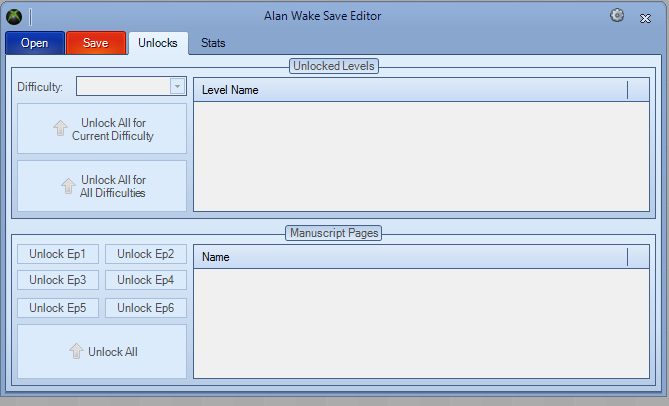
Hit the button “Open” and find the savegame that you extracted to your desktop earlier. Click on it and hit open. All your game info should appear. Mod the statistics to what you would like and hit “Save”

It will save and it will also automatically rehash and resign.
Now go back to Xport 360. Go back to where it says your Alan Wake savegame. Take the savegame(now modded) on your desktop and drag it into the other savegame in export. Replace them. Close it out, plug your HDD back into your xbox and enjoy.
