This is the official discussion topic of the
INAZUMA ELEVEN: Victory Road Trainer and Cheats in the
WeMod app. Please post any suggestions, bug reports, or praise that you may have for the cheats in here!
Download the trainer or find it in the WeMod app.
Trainer Options and Cheats:
1. [RPS] Unlimited Health
2. [RPS] Damage Received [%]
3. [RPS] Unlimited Tension
4. [RPS] Tension Earnt Multiplier
5. [RPS] No Action Cooldown
6. [Match] Unlimited Dash
7. [Match] Unlimited Tension
8. [Match] Unlimited Hyper Gauge
9. [Match] Unlimited Bond Power
10. [Match] Unlimited Keeper Power
11. [Sel. Item] Set Amount
12. XP Multiplier
13. [Match] No Tension
14. [Match] No Hyper Gauge
15. [Match] No Keeper Power
Important Notes:
Click here to view important information about these cheats.
Follow the instructions in the Wand Forums guide to ensure the trainer works properly: Link
Screenshot:
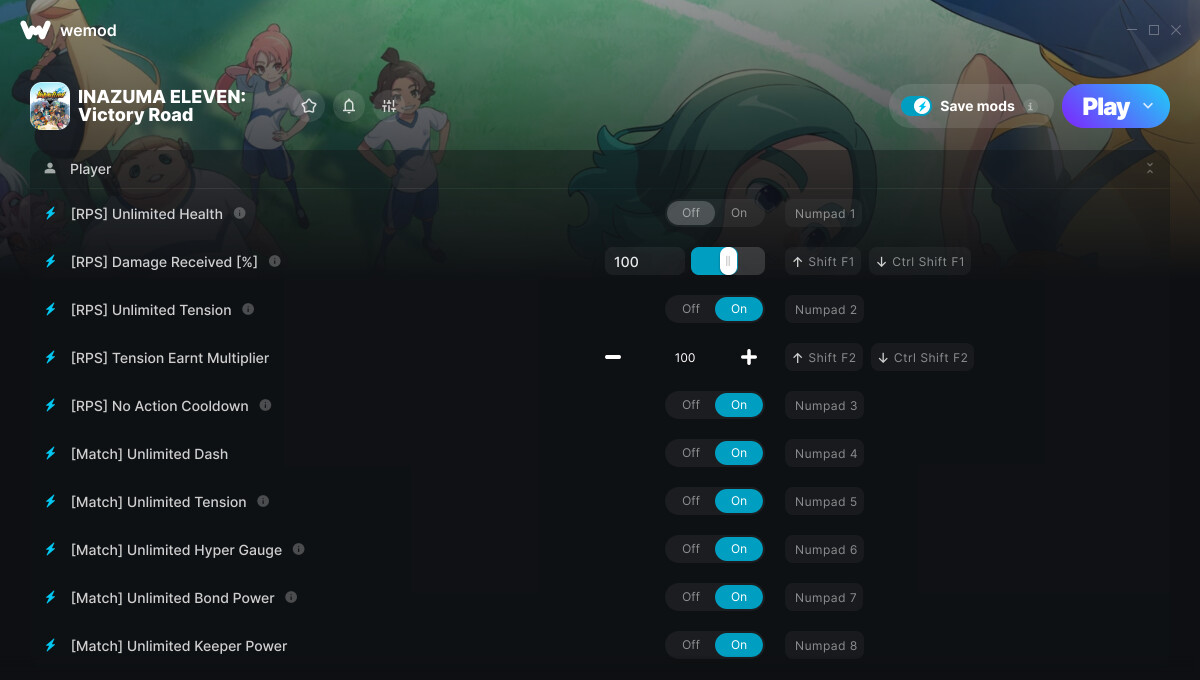
Supported Game Versions:
We strive to keep our trainers up to date with the latest game versions. WeMod automatically detects which version you have installed and activates the mods accordingly. So there’s no need to worry about which version of the game you have!
Updates and Changes:
-
11/14/2025
Started development
-
11/14/2025
Released trainer with 15 cheats
-
11/19/2025
Bug fixes and game compatibility improvements
-
02/09/2026
Bug fixes and game compatibility improvements
-
03/17/2026
Bug fixes and game compatibility improvements
-
04/02/2026
Bug fixes and game compatibility improvements
-
05/01/2026
[RPS] Unlimited Health cheat added
[RPS] Unlimited Tension cheat added
[Match] Unlimited Dash cheat added
[Match] Unlimited Tension cheat added
[Match] Unlimited Hyper Gauge cheat added
[Match] Unlimited Bond Power cheat added
[Match] Unlimited Keeper Power cheat added
XP Multiplier cheat added
-
06/12/2026
Bug fixes and game compatibility improvements
-
06/26/2026
Bug fixes and game compatibility improvements
Updated notes
-
09/14/2026
Bug fixes and game compatibility improvements
Updated notes
Like what you see?
Check out all of the games WeMod supports here.
2 Likes
The INAZUMA ELEVEN: Victory Road cheats have been updated!
Changes:
- Released trainer with 15 cheats
2 Likes
Hi, are you able to show us how to copy the your EACLauncher and replacing it? i thought i did it right but the game just wont open now
1 Like
Open the game folder through Steam.
Right click on the game → Manage → Browse Local Files.
Then inside that folder there will the EACLauncher file. Rename it to something like EACLauncher_Original and move my file there. Then if at a later point you want to play the game online, remove my file and rename the Original one.
3 Likes
got any for beans that can make it set amout?
2 Likes
If you edit the amount in story mode it works for some beans but not for all types of beans. It seems to work for almost any item except for certain beans!
1 Like
Possible to add Instant Win?
2 Likes
hope it works on every beans
3 Likes
open the gold chests they give good beans
1 Like
possible to add more xp to the matches?
2 Likes
pls add this and i love you and subscribe instant to pro
2 Likes
So I did it the way you said, but now my game just won’t open
3 Likes
Same, WeMod now throws the ‘can’t connect to Steam’ error and won’t launch it. I’ve replaced the original EAC Launcher with the one in this thread. Has Inazuma Eleven maybe updated that quickly to counter it?
1 Like
Can I ask one thing? Can the (set.item) mod also be used in the inventory of stories in the chronicle game mode?
1 Like
So, can I increase the amount of bond stars and beans in my inventory in Chronicles game mode?
1 Like
Yes, but you can set amount only for items that you own and some of them cannot be edited. I think they are online items
1 Like
To do so : click on an item, go to we mod : set amount click validate
1 Like