icecode
November 30, 2014, 2:39pm
1
After extracting the gave save
The save turns small in size. Becomes corrupt when transferring back to the xbox
Method 2
Modded the save inside the usb in horizon
Nick
November 30, 2014, 4:53pm
2
Could you please upload your State of Decay save and post it? I will look further into the issue and see if I can resolve it.
Thank you. Here it is
SOD sav
Sorry for the double post, but is there any results on this issue?
I reinstalled Horizon. Tried a new save. Still get same results.
I paid for diamond just to use this lol.
Pav
December 9, 2014, 6:19pm
4
icecode:
Thank you. Here it is
SOD sav
Dropbox - Error - Simplify your life
Sorry for the double post, but is there any results on this issue?
I reinstalled Horizon. Tried a new save. Still get same results.
I paid for diamond just to use this lol.
Sorry for the delay. What exactly are you trying to modify? When I modify it on my PC it saves fine.
Trying to mod the xbox 360 version of state of Decay with the horizon editor.
Pav
December 9, 2014, 6:31pm
6
I know that, but what within the editor are you trying to mod? And what values are you setting them to to receive the error?
Sorry.
I editing the
Ammo to 500
But even thought, I just decided to load it in the editor and save it without editing anything, and it still saves and resigns making the save under a MB making it corrupted.
icecode:
Sorry.
I editing the
Ammo to 500
But even thought, I just decided to load it in the editor and save it without editing anything, and it still saves and resigns making the save under a MB making it corrupted.
Looking into it. The save size isn’t the issue though, Horizon automatically removes padding added by the 360 if it’s not being used by the save.
I edited your save file and it turned out fine? I’m not sure what the problem is now.
Try this file:
MediaFire is a simple to use free service that lets you put all your photos, documents, music, and video in a single place so you can access them anywhere and share them everywhere.
sNaKe
December 10, 2014, 9:11pm
9
Looking into it. The save size isn’t the issue though, Horizon automatically removes padding added by the 360 if it’s not being used by the save.
I edited your save file and it turned out fine? I’m not sure what the problem is now.
Screenshot - 1e7d2e0e2bdeab92275da20d8017223c - Gyazo
Try this file:Game
Dont want to steal the thread or anything but everytime i try to mod my save, all modded values slowly drain until it hits 0. and all added weapons gets the “broken” status… Is there any way of fixing this?
icecode
December 10, 2014, 9:33pm
10
Hi! Reporting back. Thx it works! The save you provided worked.
It seems I have to delete the save in the usb before injecting the new modded save. Otherwise it got the errors above. Strange. I never had to do that before.
But Thx! it works! That’s what counts.
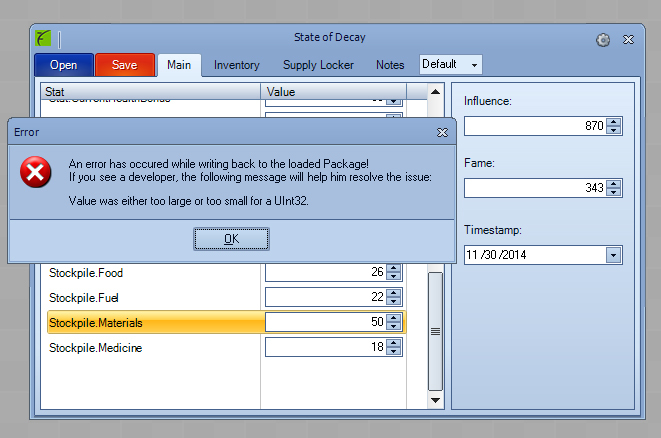
Try changing the timestamp in the “Main” tab. The game drains resources based on the time for a more realistic effect.
sNaKe
December 11, 2014, 2:07pm
12
okay thanks, going to try that.