This is the official discussion topic of the The Outer Worlds 2 Trainer and Cheats in the WeMod app. Please post any suggestions, bug reports, or praise that you may have for the cheats in here!
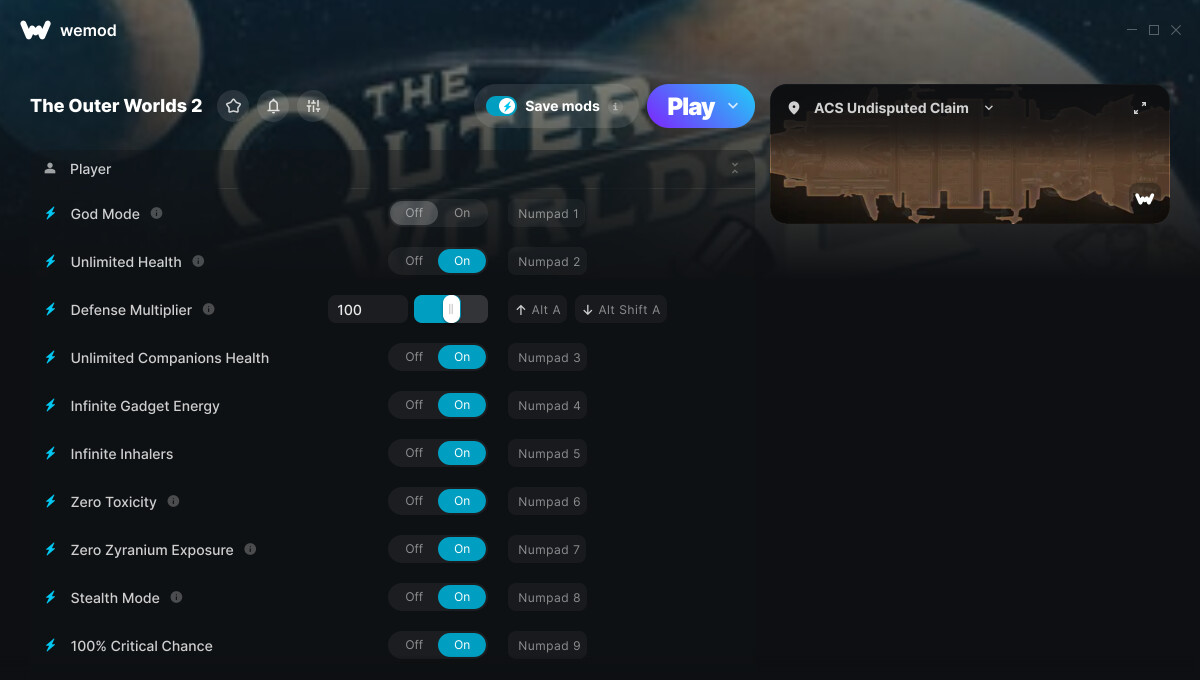
1. God Mode
2. Unlimited Health
3. Defense Multiplier
4. Unlimited Companions Health
5. Infinite Gadget Energy
6. Infinite Inhalers
7. Zero Toxicity
8. Zero Zyranium Exposure
9. Stealth Mode
10. 100% Critical Chance
11. Player Speed Multiplier
12. Edit Money
13. Edit Item Amount
14. Ignore Crafting Requirements
15. Unlimited XP
16. XP Multiplier
17. Edit Skill Points
18. Edit Perk Points
19. Max Reputation
20. Zero Bounty
21. Unlimited Ammo
22. No Reload
23. Super Accuracy
24. No Recoil
25. Infinite Grenades / Throwables
26. AI Speed Multiplier
27. One-Hit Kills
28. Damage Multiplier
29. Set Game Speed
30. Movement Speed Multiplier
31. No Fall Damage
32. Unlimited Jumps
33. Jump Height Multiplier
34. Gravity Strength
35. Set Camera FOV
36. Fly Mode
37. Increase Fly Height
Screenshot:
Supported Game Versions:
We strive to keep our trainers up to date with the latest game versions. WeMod automatically detects which version you have installed and activates the mods accordingly. So there’s no need to worry about which version of the game you have!
Updates and Changes:
10/29/2025 Started development
10/29/2025 Released trainer with 37 cheats
11/03/2025 Bug fixes and game compatibility improvements
03/11/2026 Bug fixes and game compatibility improvements
06/25/2026 God Mode cheat added Unlimited Health cheat added Unlimited Companions Health cheat added Player Speed Multiplier cheat added Unlimited XP cheat added XP Multiplier cheat added Unlimited Ammo cheat added Infinite Grenades / Throwables cheat added AI Speed Multiplier cheat added One-Hit Kills cheat added Movement Speed Multiplier cheat added Unlimited Jumps cheat added Jump Height Multiplier cheat added Gravity Strength cheat added Set Camera FOV cheat added
URGENT: The Outer Worlds 2 (PC Xbox Version) Freezes When WeMod Launches
Hi everyone,
I’m having a serious issue with The Outer Worlds 2 (PC Xbox Game Pass version). The game completely freezes whenever I open or attach WeMod. It runs normally without WeMod, but as soon as I launch the trainer, the game locks up — no response, forced to close from Task Manager.
System details:
Platform: PC
Version: Xbox / Game Pass
OS: Windows 11 Pro (fully updated)
GPU: RTX 5090
CPU: Ryzen 9 9950X3D
WeMod: Latest version (updated today)
Game version: Latest Xbox version (no mods installed)
What I tried:
Running both WeMod and game as Administrator
Disabling antivirus and Windows Defender
Reinstalling WeMod and the game
Launching WeMod before and after the game
Checking background overlays (Xbox Game Bar, MSI Afterburner, etc.)
Nothing helped — it still freezes instantly after WeMod attaches.
Please fix this ASAP or let me know if there’s a temporary workaround. The game works flawlessly until WeMod connects, so it seems like a compatibility issue with the Xbox version specifically.
not sure if it still works but what i was doing, you have to have 2 of the same item. you open your inventory change the amount of items you want in the mod menu, then drop the inventory item(but not all of it, which is why you need atleast 2 of them) you’ll drop 1 on the ground and then have whatever amount you put into the mod in your inventory.
still worked for me, also infinite ammo does work…it just doesnt stay enabled, but ammo count did not drop for me. no reload and inf health worked fine with latest update.
The OW2 hotfix screwed something up in the ammo script. Was using a Cheat Evolution trainer before this was released and going back that trainer’s ammo cheat isn’t working either.

 URGENT: The Outer Worlds 2 (PC Xbox Version) Freezes When WeMod Launches