[i][b]
Most should know how to do this, but if not here it is.
How to convert a downloaded ISO file into a playable Jtag game.
Requirements
- Jtag with xexmenu
- downloaded .ISO file
- Xbox image browser
Open Xbox Image Browser, Click File[INDENT] [/INDENT]Click Open Image Fie (its missing “L” for whatever reason)[INDENT]
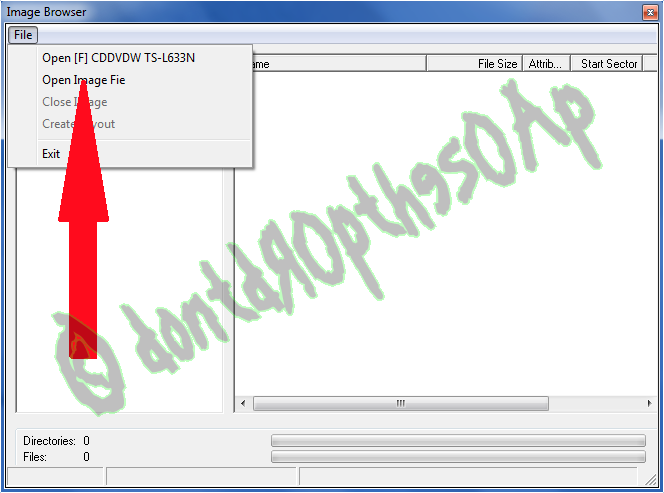 [/INDENT]Select your ISO file[INDENT]
 [/INDENT]Click Open[INDENT]
 [/INDENT]Right-click on the .iso file[INDENT]
 [/INDENT]Click Extract[INDENT]
 [/INDENT]’
Click on Make New Folder[INDENT] [/INDENT]Name the folder what ever you want, I name it after the game[INDENT]
 [/INDENT]Make sure your new folder is selected and click OK[INDENT]
 [/INDENT]Let it do its thing, it shows the progress in the lower left[INDENT]
 [/INDENT]Once it done the bottom three spaces will be blank, now close the window and then close XBC[INDENT]
 [/INDENT]The folder is done, transfer it to your Games folder on your Jtag and enjoy[INDENT]
 [/INDENT]Credits
dontdr0ptheS0AP, for the TUT
Redline99, for Xbox Image Browser

 , my jtag never had a working disc tray lol.
 My disk tray is very temperamental, I have to take the face plate off and and use a paper clip in the little hole to get it open.