This is the official discussion topic of the
Fallout 3: Game of the Year Edition Trainer and Cheats in the
WeMod app. Please post any suggestions, bug reports, or praise that you may have for the cheats in here!
Download the trainer or find it in the WeMod app.
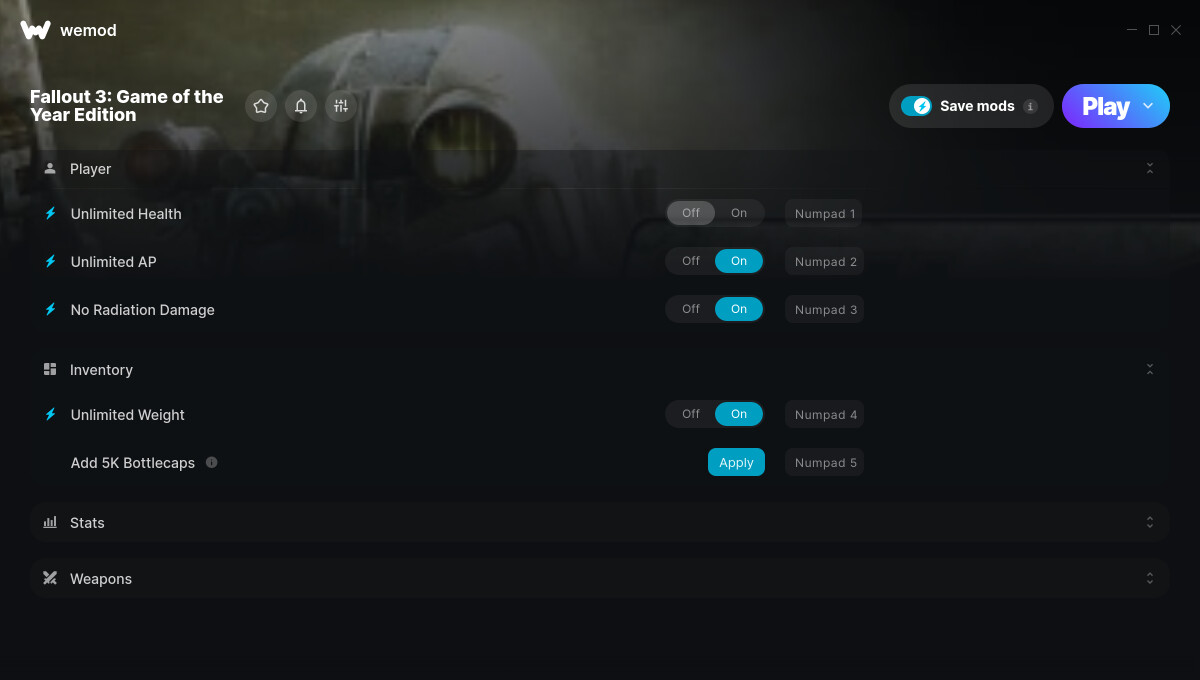
Trainer Options and Cheats:
1. Unlimited Health
2. Unlimited AP
3. No Radiation Damage
4. Unlimited Weight
5. Add 5K Bottlecaps
6. Add 5K XP
7. Unlimited Ammo
8. No Reload
9. Unlimited Weapon Durability
Screenshot:
Supported Game Versions:
We strive to keep our trainers up to date with the latest game versions. WeMod automatically detects which version you have installed and activates the mods accordingly. So there’s no need to worry about which version of the game you have!
Updates and Changes:
-
01/19/2023
Started development
-
01/19/2023
Released trainer with 9 cheats
-
11/13/2023
Bug fixes and game compatibility improvements
Like what you see?
Check out all of the games WeMod supports here.
1 Like
The Fallout 3: Game of the Year Edition cheats have been updated!
Changes:
- Released trainer with 9 cheats
2 Likes
Doesn’t work. it says it need to be 32bit but i have no control over that
When you get an error message, paste it into the search box in the top-right of the community. 
Since WeMod has been around for years now, most error messages are likely already addressed and solved elsewhere.
Here you go: "These cheats were made for the 64-bit version of the game, you are running the 32-bit version" - #2 by Ravenfyre. (Also relevant to the opposite version of the error).
1 Like
no offence Mr.fyre but you provide no fixes to this problem i went through the post with a fine tooth comb and even spent over an hour digging threw game and system files and still no way to fix this problem even when the game is launched first and you alt-tab out as soon as you click play before you can tab back the same error message comes up. i love wemod its has been perfect up till now i wanted to play FO3 for old times sake and got very excited when i found it on wemod for xbox gamepass i just wish there was a solution that worked so i could use wemod with it
2 Likes
There is a problem with this trainer. I have read how to fix the issues but they are a generic fix, not the fix for the previously stated issue.
This trainer was made approx 1.5 mnths ago for the Gamepass Game of the Year edition. It doesnt come with 32bit/64bit optional choices. There is also NO fix I can find that addresses this specific problem.
I purchased Fallout 3 via steam when there was a wemod cheat and the same issue happened then. I d/l another version via gamepass and now a month after the mod was made theres issues of the same ??
Please address this problem. with answers not generic responses that have NO bearing on the questions asked.
1 Like
Have the same problem. Running Windows 10 Pro 64-bit. Had to reinstall game from Xbox App due to drive corruption. Fallout 3 GOTY is only 32-bit as far as I can tell, so the trainer is useless. It has never worked for me no matter when I press Play - to start game, at loader, at main menu, or in game. Hey, but thanks for trying.
Since theres no 64bit version of the game on the windows store, who made the cheats for the xbox version?
Did they even test things?
1 Like
will there ever be a fix for the gamepass version of the game, not sure why the trainer exists if it doesnt even load with the game.
The Fallout 3: Game of the Year Edition cheats have been updated!
Changes:
- Bug fixes and game compatibility improvements
seem like no one is watching this thread but the game pass version crashes to often. Hope they can fix it and test it too
Full disclosure: As of 07/19/2025, these modes DO NOT WORK.
I was able to start a brand new game by clicking the “Play” icon on WeMod.
I went through Fallout 3’s excrutiatingly long and pretentious prologue section, finally got into the Wasteland after maybe and hour of BS, and I needed to log out to run an errand. I’ll state during this initial period most of the mods like unlimited health and AP aren’t useable anyways because you’re just running around talking to NPCs and crap, but when I did finally get to use the game’s features, unlimited weight and unlimited AP seem to be working (AP is not really unlimited by the way, it just refills instantly after VATS). When I log back in and load my game, hmm, unlimited weight doesn’t seem to be working, my overencumbered character can’t run. Oh no! Better tab out the game to see what’s going on. But wait! Bethesda games won’t let you tab-out, so I need to force escape from the game window. I see that all of WeMods mods have been turned off for some reason. It tells me I’m “Playing” but if I click to turn the mods on it just doesn’t do it, they slide right back to off.
Finally after closing and relaunching WeMod I can get Unlimited Health, Unlimited AP, and No Radiation Damage to turn “On” but it does the nope, slide-back-to-off thing for all the other mods; won’t let me turn them on. I click back on my game window which has been open all this time and it crashes.
Restarting my computer, installing/uninstalling the game, WeMod, disabling Anti-Virus, adding WeMod to exceptions all do NOTHING.
I probably tried like 50 times and the result is the same. These mods do not work. Please remove them from your server.
Just tried to use the trainer on the latest version of the game and the game crashes instantly.
This trainer is out of date and as far as i can tell No longer working.