If your money goes too high, the game bugs out and your total funds will end up in the negative. It’s not something the trainer can fix, as it’s a limitation of the game itself.
As far as I recall from the last time I played this game, if you use the unlimited items cheat, it also has a side effect where you gain, instead of spend, money when you buy things from vendors or vending machines. So you don’t really need the unlimited money cheat, really, if you use infinite items too.
Even with Unlimited Weight enabled the game still considers your character overloaded when calculating flaws (you’ll still get pop ups suggesting them and you’ll still see the penalties if you already have one).
Mod isnt working for me at all. Cant turn on any of the cheats. Pressing any mod to activate, it just gives me a “blip” sound and then the slider instantly goes back to off.
Cant even set the “unlimited money” to on. It just goes off automatically with the accompanying “blip” sound
Trainers tend to break and need an update after the game itself updates or gets a patch.
According to SteamDB - the last update to this game was in June 2023. This is also what the game’s own official announcements say as well. So there’s no immediate real reason for the trainer to suddenly break on the technical side at WeMod.
Let’s go through a quick checklist before we ask the testers to take a look:
Make sure you own the game from Steam to be using this Steam trainer. If you have the game on another platform, such as Epic Games, you need to use the trainer made specifically for that platform.
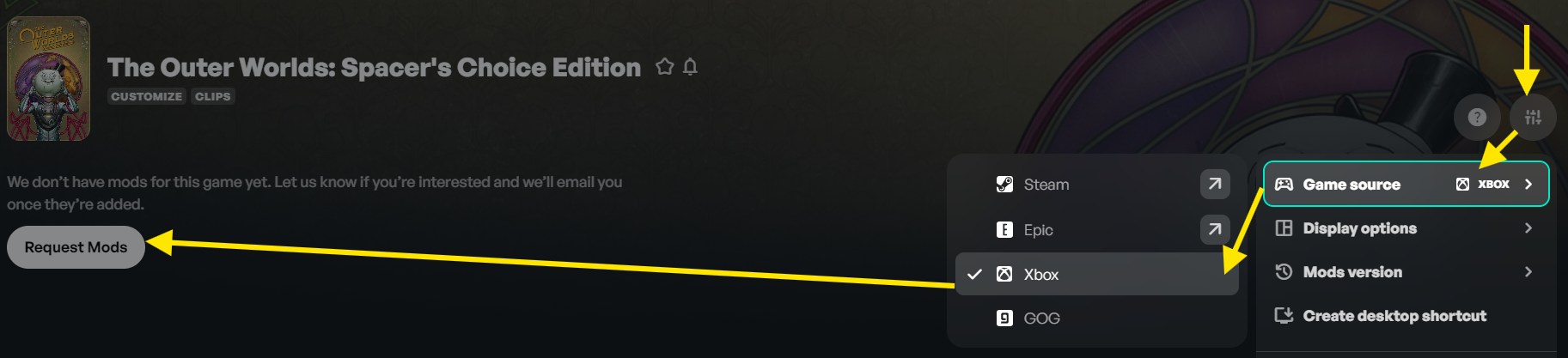
Click “Mod Settings” next to the game name in the trainer, and then “Game Source” to change the platform you have the game on if it is incorrect.
Make sure you have the Spacer’s Choice edition of the game to be using this specific trainer. If you have the Standard Edition, you need to use this one instead: The Outer Worlds Cheats and Trainer for Steam.
Try running the game first via Steam. And then only press Play in the trainer when you are on the main menu of the game.
Try turning off the overlay by clicking the “Overlay” slider to the “off” position in the top-right of the trainer before launching the game & trainer.
Companions level up when you level up and get a perk point for every 5 levels. If I recall correctly, they can only have a maximum of 6 total perks unlocked, so choose wisely.
So when you use the Mega XP cheat to level yourself up, you’re also levelling up your companions at the same time. You just need to bear in mind that:
You get a perk point for yourself every 2 levels you go up.
Your companions get a perk point for every 5 levels you go up.
You’ll need to be level 30 for your companions to have the maximum number of perk points.
yes that is true but with the level cap at 99 now you can get all there perks but 1 i mean its not a big deal but i just dont like have just 1 left to where i cant get it, and the max perk points they get is 18 or 19 and you need 20 but since the robot only has 18 or 19 perks ik thats why they stopped it at that number
Its not about buying ammo, not sure where you got this idea from. it’s about tinkering the equipment, setting the max bits 999,999 limits the player. why not set it to the max value the game can handle? Like 1.99 billion. setting as 999,999 limits the user experience as we can’t increase the level of our items. I hope this gets fixed soon.
Hello @marwan_saksouk.
Use the unlimited items cheat instead, as mentioned in some older posts. In this particular game, currency is considered an “item” by the game’s developers.
Something strange started today, running new game, unlimited items, eveyrthing works right except weapons parts do not become unlimited no matter how many i pick up. tried resetting unlimited items on and off etc still doesnt work..any ideas?
Yes, this is correct. The trainer you are commenting on is built for the Steam version of the game. Steam and Microsoft Store/Xbox versions of any game are coded very differently, despite being the same game, hence they need different trainers made specifically for their store version.
Trainers are built or updated per platform based on their overall popularity amongst all WeMod members as a whole.
I know this is an older trainer, with the most recent update the reputation option seems to not want to work. Please advise if planning to update the trainer?