Waterpark Simulator Cheats and Trainer for Steam

Waterpark Simulator
This is the official discussion topic of the Waterpark Simulator Trainer and Cheats in the WeMod app. Please post any suggestions, bug reports, or praise that you may have for the cheats in here!

Download Trainer

Download the trainer or find it in the WeMod app.


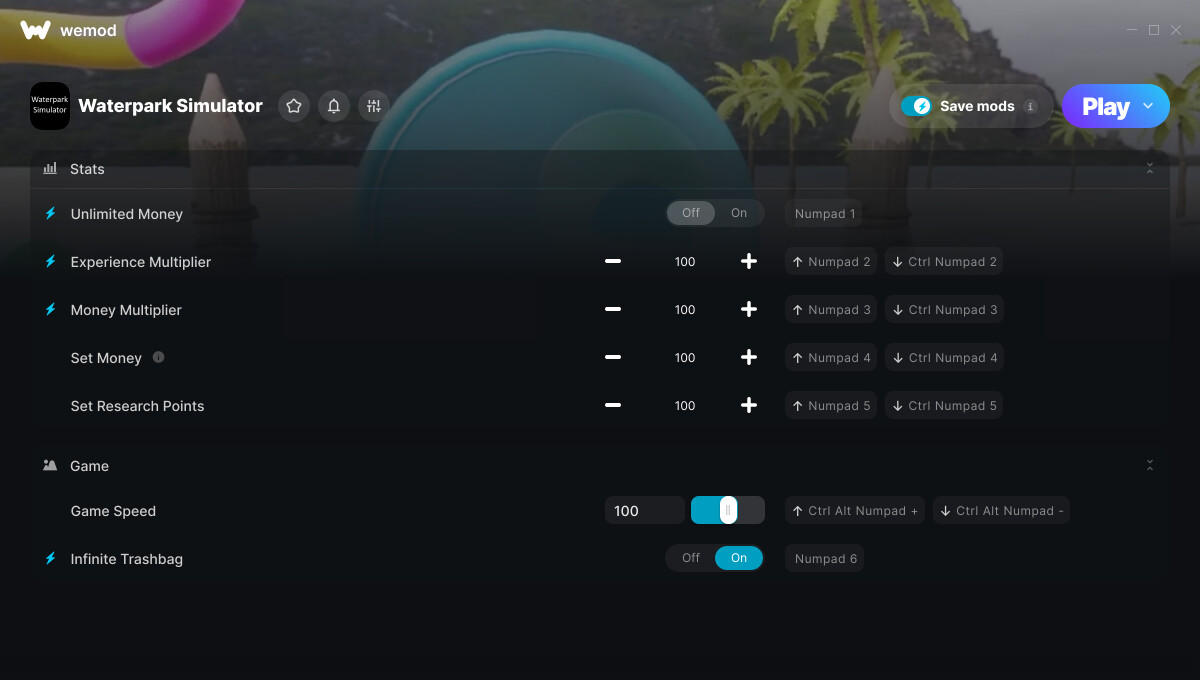
Trainer Options and Cheats:

1. Unlimited Money
2. Experience Multiplier
3. Money Multiplier
4. Set Money
5. Set Research Points
6. Game Speed
7. Infinite Trashbag


Screenshot:


Supported Game Versions:

We strive to keep our trainers up to date with the latest game versions. WeMod automatically detects which version you have installed and activates the mods accordingly. So there’s no need to worry about which version of the game you have!


Updates and Changes:

  • 08/29/2025
    Started development

  • 08/29/2025
    Released trainer with 7 cheats

  • 12/17/2025
    Bug fixes and game compatibility improvements

  • 01/13/2026
    Bug fixes and game compatibility improvements

  • 01/29/2026
    Bug fixes and game compatibility improvements


Like what you see?

Check out all of the games WeMod supports here.

1 Like

The Waterpark Simulator cheats have been updated!

Changes:

  • Released trainer with 7 cheats
2 Likes

Hello,

First off I would like to say thank you for the mod. It works perfectly, I do have some suggestions if it’s possible in a future update.

  • Instant Repair/Never Break
  • Instant Clean/Never Dirty
  • Food/Drink Stands never run out of stock

If these can’t be added, no big deal just some stuff I’ve noticed while playing. Thank you again for all you do!

4 Likes

Probably not, as the game is not mod friendly. If it were I would have added those 100%, but the Game Developers thought that they should go out of their way to make it worse for us modders.
I might still take a look and see if I can make any of those work, but no promises.

1 Like

+1

Would it be possible to increase the amount of employees we can have?

1 Like

Damn, you guys couldn’t get Mono calls to work either. I thought I was going crazy as it’s all there staring me in the face but all calls failed.

It’s all manual mode for now. Hold LCtrl, LShift & Tilda (`) for 5 seconds. You will know it’s enabled because your character will do a little jolt / movement whilst in the crouch position.

Then press all 3 again at the exact time to open the console (and I mean exactly).

Then type “commands” to see the full list. Here are a few you are after -

park.BuildAll
park.RepairAll
park.CleanAll
park.RestockAll
park.Prestige (enter a space and then the number of stars you want)
research.UnlockAll

There are heaps of cool things to play with but also enabling Dev mode assigns functions to the F1 - F12 keys. There is one that also spawns NPC’s. It’s a bit of fun.

doesn’t work. I see the character does the jolt but after the jolt and pressing all 3 again at the same exact time does nothing.

Further testing, holding crouch for 5 seconds does the jolt anyways. I also asked the devs and they confirmed there is no dev console

If you are using game version 0.2.9, I can assure you it’s there. I just checked v0.2.22 and they have patched out the CheatManager script, however the QuantumConsole (debug handler) still exists.
Here are the strings pulled from the Assembly-CSharp.dll file on v0.2.9 to open QC -

// Token: 0x06000662 RID: 1634 RVA: 0x0001C3B4 File Offset: 0x0001A5B4
	private void Update()
	{
		if (this.baxt && this.CheatConfig != null)
		{
			this.CheatConfig.bamg();
		}
		if (Time.time > 120f && !this.baxt)
		{
			UnityEngine.Object.Destroy(base.gameObject);
		}
		if (Input.GetKey(KeyCode.LeftControl) && Input.GetKey(KeyCode.LeftShift) && Input.GetKey(KeyCode.BackQuote))
		{
			this.baxu += Time.unscaledDeltaTime;
			if (this.baxu >= this.ComboHoldTime)
			{
				this.bamv();
			}
		}
	}
// Token: 0x06000663 RID: 1635 RVA: 0x0001C448 File Offset: 0x0001A648
	private void bamv()
	{
		if (this.baxt)
		{
			return;
		}
		Debug.Log(a.nl());
		this.baxt = true;
		UnityEngine.Object.Instantiate<GameObject>(this.QuantumConsolePrefab);
		if (PlayerCharacter.sfq != null)
		{
			PlayerCharacter.sfq.InputSystem.TryRegisterConsole();
		}

loving the mods so far working greatly was wondering if a mod to give your self 5 star rating would be a thing that could be added or a mod to unlock all park research items or even a mod to complete all tasks so you dont have to spend hrs upon hrs doing them all thanks again for the work you do keep it up. <3

1 Like

is there a freeze time cheat

1 Like

:white_check_mark: Step 1 — Install BepInEx

  1. Download BepInEx x64 (5.x version) from the official GitHub releases page.

  2. Extract the zip into your game’s main folder (where WaterparkSimulator.exe is).

  3. After extraction, your folder should have:

    • BepInEx/

    • winhttp.dll

    • doorstop_config.ini


:white_check_mark: Step 2 — First Run

  1. Launch the game once.

  2. BepInEx will create subfolders inside BepInEx/ (including plugins/).

  3. Close the game.


:white_check_mark: Step 3 — Add the Cheat Plugin

  1. Place CheatHotkeys.dll into:

    WaterparkSimulator\BepInEx\plugins\
    
    
  2. Start the game again.

  3. The mod is now active.


:white_check_mark: Step 4 — Use Hotkeys

Press the following keys in-game to trigger cheats:

  • F3 → (built-in) Add money

  • F5 → Add $100k

  • F6 → Unlock Cleaning

  • F7 → Unlock Repairing

  • F8 → Set prestige to :star::star::star::star::star: (5 stars)

  • F9 → Super Cheat (money + prestige + unlocks + open park)

  • F10 → Open Park

  • F11 → Close Park

  • F12 → Set Day to 20

Get the dll file from me on discord @Hyper674

As well as freeze time

Make ur character run and do stuff faster and more

Get the dll file from me on discord @Hyper674

1 Like

yes we NEED these

can we have a mod to insta clean and insta repair pls

Yeah, totally not a scam.

What is game speed supposed to do?

The Waterpark Simulator cheats have been updated!

Changes:

  • Bug fixes and game compatibility improvements

On January 6, the trainer stopped working, the game stopped being detected in the Wand library, but at the same time, my antiviruses are disabled and all versions are up to date, what should I do?

+1 , I have the same issue since today. when I manually add the game, I can use “play” and the game starts, but wand gives me an error message that the game was not found? I also can’t have the game started and then press play bc wand gives me the same error as before. Maybe it has to do with an update the game got, but it’s still a bit strange